
Guide
Lower Back Pain From Sitting: Causes, Self-Checks, and Desk Changes
Sitting loads the lumbar discs about 40 percent more than standing. What that does to your lower back, and the desk fixes and self-checks that help most.
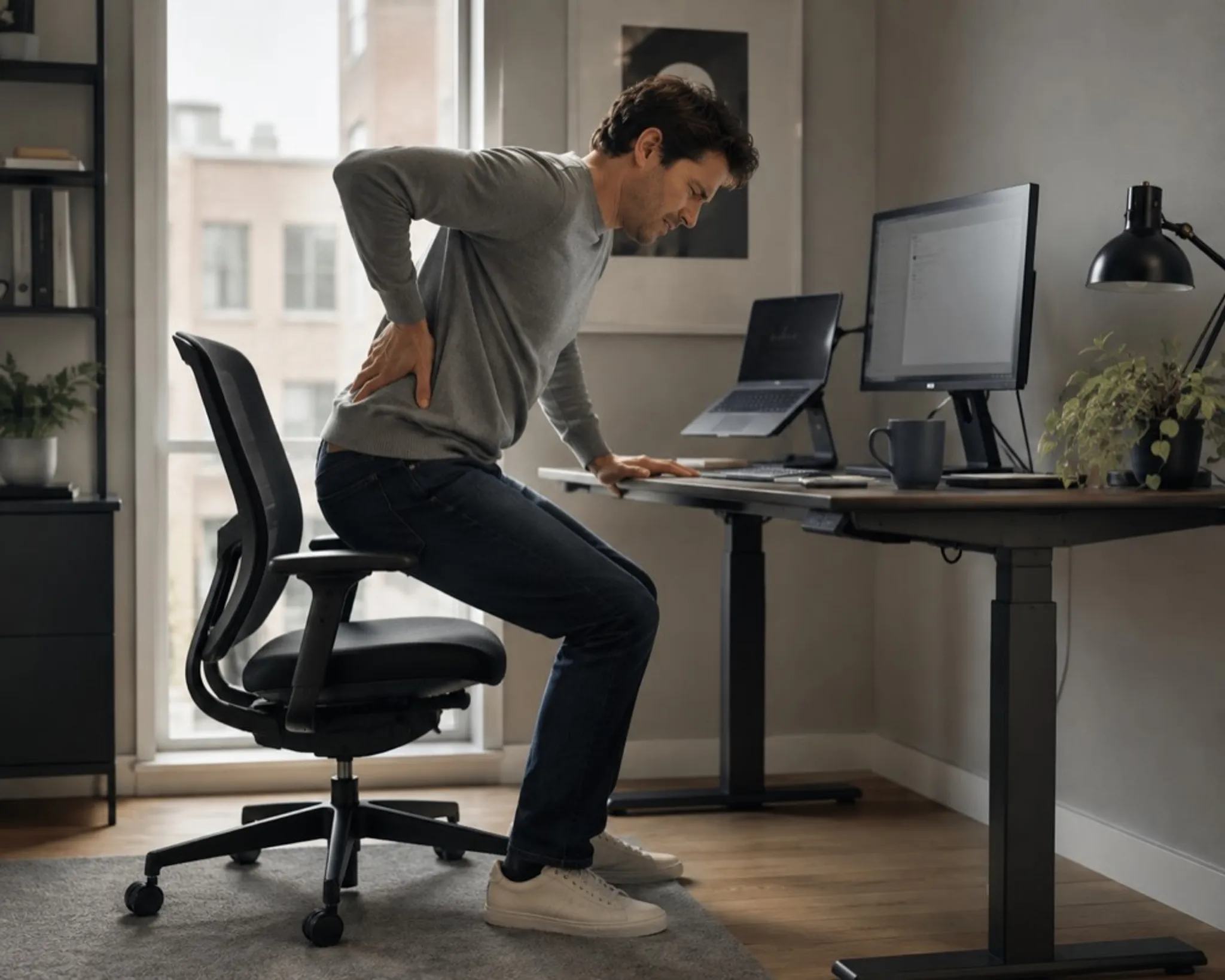
You sit down at 9am feeling fine. By three in the afternoon there is a dull ache low and central in your back, a stiffness that makes you shift every few minutes, and a sharp protest when you finally stand up. That arc, fine at breakfast, sore by the afternoon standup, is the signature of sitting-driven lower back pain, and it has a mechanical explanation you can do something about.
Below: what hours in a chair actually do to your lumbar spine, four quick self-checks that show whether your setup is feeding the ache, and the desk changes most often recommended for sitting-related discomfort. A chair can help. It cannot treat anything. Both halves of that sentence matter on this topic.
Why does sitting cause lower back pain?
Sitting feels like rest, but for your lower back it is closer to a slow, static workout you never signed up for. Standing lets your spine stack in its natural curves and spreads load across a lot of tissue. Sit down, especially in a slump, and that load concentrates. Nachemson's in-vivo disc-pressure measurements (Spine, 1981) found unsupported sitting raises pressure on the lumbar discs by about 40 percent compared with standing.
Three things tend to happen together:
- The pelvis rolls backward. When you settle into a chair and relax, the pelvis tips back into what is called posterior pelvic tilt. Your tailbone tucks under and you sink onto the base of your spine rather than sitting up on your sit bones.
- The lumbar curve flattens or reverses. Your lower back has a natural inward curve. As the pelvis rolls back, that curve flattens out and sometimes rounds the wrong way, which loads the front of the discs and the soft tissue at the back. Keegan's radiographic work (The Journal of Bone and Joint Surgery, 1953) traced this to the hip angle: at 90 degrees the pelvis rotates back and the curve flattens, while a trunk-thigh angle near 135 degrees preserved it.
- Everything stays still. Muscles are built to contract and release. Hold any position long enough and the tissue fatigues, circulation drops, and the ache sets in. Research on sitting posture generally suggests that how long you hold a position matters as much as the position itself.
Add a low screen, a chair with no real lower-back support, and a full day of meetings, and every ingredient for a sore lower back is on the table.
What is actually happening to your spine when you sit?
It helps to picture the chain of events rather than just the endpoint. A relaxed slump is not one problem, it is several small ones stacking on top of each other, and each one feeds the next.
| What goes wrong | What it feels like | The desk fix that helps |
|---|---|---|
| Pelvis rolls back (posterior tilt) | Sitting "on" the tailbone, sliding forward in the seat | Sit on your sit bones; support that keeps the pelvis upright |
| Lumbar curve flattens | Dull ache low and central, worse the longer you sit | Lower-back support in your upright working posture, not just when reclined |
| Hip angle closes toward 90 degrees or tighter | Tight hips, stiffness when standing up | An open hip angle so the pelvis is not forced to roll back |
| Static loading, no movement | Stiffness, needing to fidget and shift | Move and change posture every 20 to 30 minutes |
| Screen too low, head drifts forward | Neck and upper-back tension that pulls the whole spine out of line | Raise the screen so the top is near eye level |
Notice how many of the rows point back to the same root causes: the pelvis rolling backward and the hips staying closed. Tight hip flexors from years of sitting quietly pull on the pelvis and make that roll worse, which is why the lower back and the hips are so often part of the same story. If your hips feel tight, our guide to tight hip flexors from sitting covers the stretches most people are pointed toward, and the anterior pelvic tilt from sitting page covers the opposite pelvic pattern that also drives lower-back complaints.
How do you tell if your chair or setup is the problem?
A few quick self-checks reveal a lot. None of these diagnose anything medical. They just tell you where to look first.
- The stand-up test. Does the ache ease within a minute or two of standing and walking? Pain that clearly loosens with movement often points to static sitting as a driver.
- The slide check. By mid-afternoon, have you slid forward so your lower back has lost contact with the backrest? That slide is the pelvis rolling back and is a strong signal your seat is letting you collapse.
- The lumbar gap. Reach behind your lower back while sitting upright to work. Is there a supportive contact there, or a hollow gap? Most chairs support you when you lean back and quietly abandon you in the forward, leaning-in posture where you do actual work.
- The screen line. Is the top of your monitor near eye level, or are you looking down? A low screen pulls your head forward and drags the rest of your spine with it.
If several of these ring true, your daily environment is likely part of the picture, and the fixes below are worth a real try before anything drastic.
What desk changes actually reduce lower back pain?
No single change addresses everything, and results vary between people, but these are the adjustments most commonly recommended for desk setups.
Move more often than you think you need to. The best posture is the next one. Set a nudge every 20 to 30 minutes to stand, walk to fill a water glass, or simply shift how you are sitting. Movement is the single most protective habit for a sitting spine.
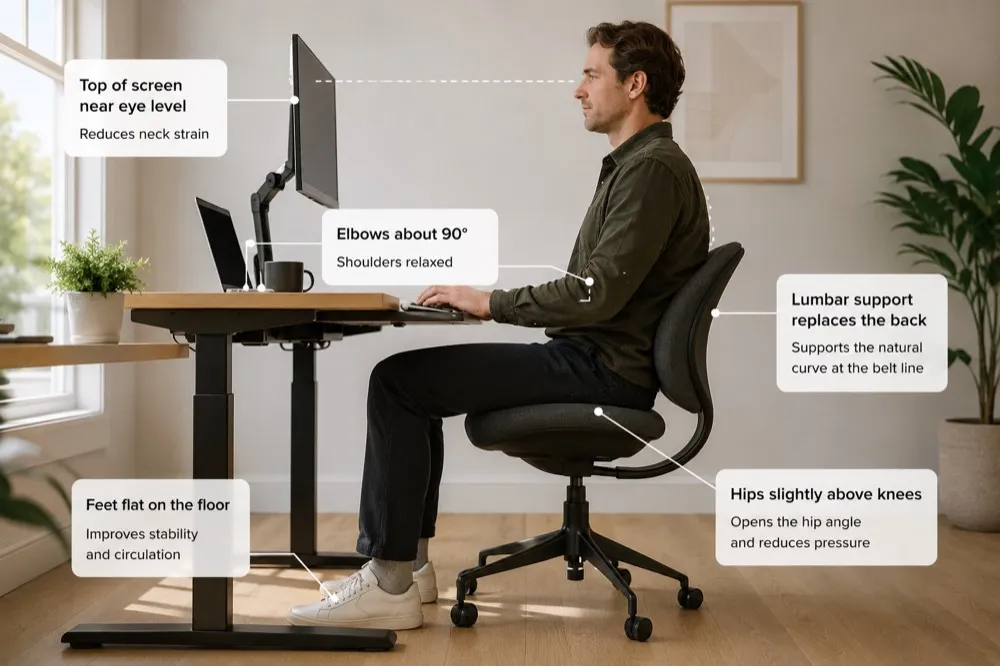
Protect the hip angle. A hip angle jammed at 90 degrees or tighter forces the pelvis to roll back. Opening that angle, so your thighs slope gently down and away from your torso, lets the pelvis sit more upright on its own. This is the core idea behind active sitting and open-hip seating concepts.
Support the lower back in your working posture. Lumbar support only counts if it reaches you when you are leaning in to type, not just when you recline. If your chair lacks it, a small cushion or rolled towel at the belt line can restore some of the curve.
Raise your screen and drop your keyboard. Top of the monitor near eye level, elbows around 90 degrees, wrists neutral. Getting the head over the shoulders takes a surprising amount of strain off the lower back.
Add gentle, regular movement. Commonly recommended options include standing hip-flexor stretches, glute activation, and easy spinal rotations. Pair any routine with the see-a-professional note below, and stop anything that sharpens pain.
For the full picture on retraining your default posture, the how to fix your posture field guide is the hub that ties these threads together.
When should you see a professional?
Most sitting-related aches are mechanical and ease with movement and setup changes. Some pain is a signal to get checked. See a qualified clinician (a doctor, physiotherapist, or chiropractor) if you have pain that travels down one leg, numbness, tingling, or weakness in a leg or foot, pain that wakes you at night, pain following a fall or injury, or an ache that has not improved after a few weeks of sensible changes. Pain that radiates down the leg in particular can point toward nerve involvement, which is worth a proper assessment. Our guide on sciatica from sitting explains that pattern in plain terms. When in doubt, get it looked at.
Why do good habits not stick?
The stretches and habits above compete with the eight hours a day you spend at 90 degrees, and the 90 degrees usually wins. Changing the environment ends that tug-of-war.
The Vision Chair approaches it from the seat rather than the backrest. Angling the seat forward tips the pelvis forward, which lets the lumbar curve return without a pad pushing into your back, and because the backrest is linked to the seat and moves with it, the hip angle stays between roughly 115 and 125 degrees whatever you are doing. Leaning in to type does not close it. The patent-pending T-Mech™ swings the seat on a knee-pivoted arc so your thighs stay supported through the range. One practical consequence: the angle raises how high you sit, so the desk has to rise to meet it.
It is not a treatment and will not fix a medical condition. What it changes is the default, so the good habits above have somewhere to land. That is the idea behind Elevated Seating.
This assumes a desk that can move. Angling the seat forward raises your seated height, so the work surface has to come up too. A fixed desk at the usual 73cm is the constraint that stops the approach working.
Frequently asked questions
Can sitting really be the main cause of my lower back pain?
For many desk workers, prolonged static sitting is a major contributor. It is rarely the only factor, but the combination of a rolled-back pelvis, a flattened lumbar curve, and hours without movement is a common recipe. If simple changes to movement and setup make a noticeable difference, sitting may be one of the contributing factors, though only a clinician can assess that properly.
Is a standing desk the answer?
Standing helps by breaking up static loading, but standing still all day brings its own aches. The benefit comes from alternating and moving, not from standing rigidly for hours. Treat a standing desk as one tool for adding movement, not a cure.
Does lumbar support actually help?
Many people find it helps, with one caveat: it only counts if it reaches your lower back in the forward, leaning-in posture where you actually work, not just when you recline. A lot of chairs support the recline and abandon the working posture, which is where the ache tends to build.
How long before desk changes make a difference?
Timelines vary widely between individuals, and some changes take considerably longer than others. If a few weeks of sensible changes bring no improvement, that is a signal to see a professional rather than push through.
A reminder before you change anything: this page is general educational information about desks and seating, not medical advice, and no chair or desk adjustment treats a medical condition. If your pain is severe, worsening, or comes with numbness, weakness, or other symptoms that worry you, see a qualified healthcare professional first.