
Guide
How to Fix Forward Head Posture: Desk Changes That Help
Your screen height and hip angle pull your head forward all day. Six desk changes, what the research shows, and how long the fix really takes.

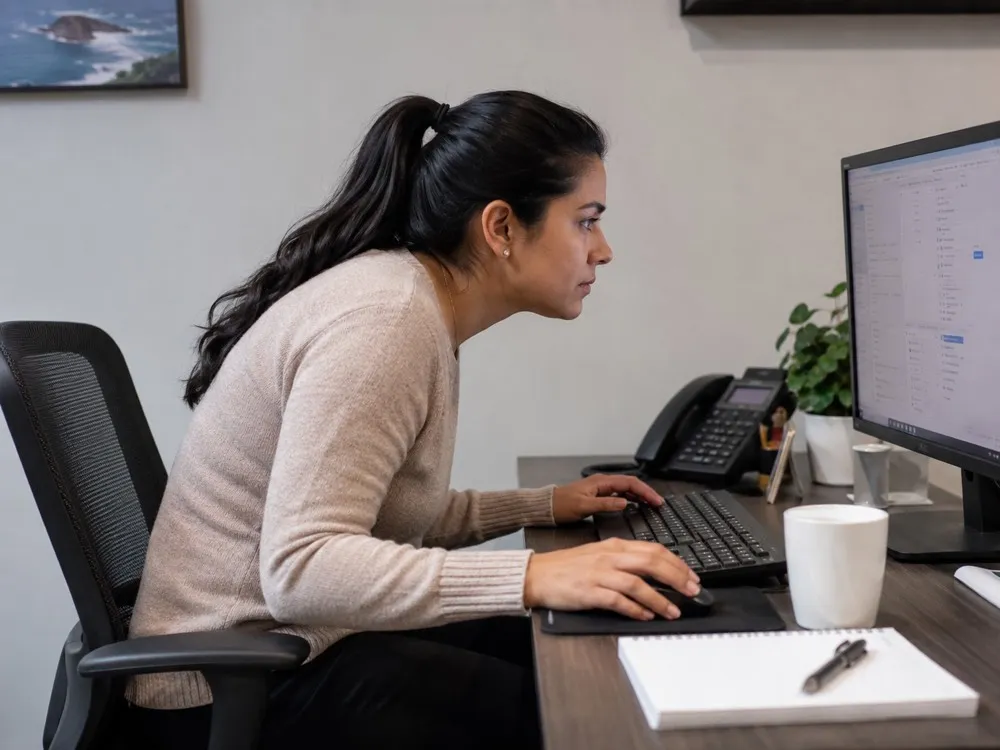
If you have ever caught your reflection on a video call, chin jutting toward the screen, shoulders rounding forward, you have seen forward head posture in the wild. It is one of the most common desk-work patterns there is, and fixing it is less about willpower than about changing a setup that pulls your head forward for eight hours a day.
Three things do most of the pulling: a screen that sits too low, a chair that collapses the base of your spine, and long stretches of stillness in between. Change those and the neck largely follows. Below: what forward head posture is, why sitting drives it, and the changes that still hold a month in.
What is forward head posture, and is "tech neck" the same thing?
Forward head posture is when your head sits ahead of your shoulders instead of stacked over them. Viewed from the side, the ear falls forward of the middle of the shoulder rather than lining up with it. "Tech neck" is the everyday nickname for the same thing, named after the phones and laptops that encourage it.
Your head is heavy. When it drifts forward, the muscles at the back of your neck and upper shoulders have to work harder to hold it up, which is why that region often feels tight or achy by mid-afternoon. General ergonomics guidance has long pointed out that a head held forward loads the neck far more than a head held over the shoulders. You do not need a specific figure to feel the truth of it after a long day at a screen.
None of this means anything is broken. Forward head posture is a pattern the body has drifted into because the environment rewarded it. Patterns respond to changing the environment.
Why does sitting at a desk push your head forward?
A desk quietly stacks several nudges in the same direction. Seeing them is half the fix, because you cannot correct what you cannot see.
| What pushes the head forward | Why it happens | The change that helps |
|---|---|---|
| Low laptop or monitor | Your eyes drop to the screen and your head follows | Raise the top of the screen to near eye level |
| Reading small text | You lean in to see | Increase font size, sit closer, get an eye check if needed |
| Slouched pelvis | When the lower back rounds, the head juts forward to stay level | Keep the pelvis upright and the hip angle open |
| Long static sitting | Muscles fatigue and you collapse toward the screen | Move and reset every 30 to 45 minutes |
| Phone use | Looking down at a handheld device for long stretches | Raise the phone toward eye level, shorten sessions |
The pelvis row is the one most people miss. Your posture is a stack, and it fails from the bottom up. Keegan's radiographic work (The Journal of Bone and Joint Surgery, 1953) showed that at a 90 degree hip angle the pelvis rotates backward and the lumbar curve flattens. Once the lower back rounds, the upper back follows, and the head pokes forward to keep your eyes level with the world. Fixing the top of the stack is hard when the bottom has collapsed. This is the same mechanic behind lower back pain from sitting and behind anterior pelvic tilt from sitting, which is why these problems so often travel together.
How can you tell if you have forward head posture?
You do not need a clinic to get a rough read. A few plain checks:
- The wall test. Stand with your heels, buttocks, and upper back lightly touching a wall. Notice whether the back of your head reaches the wall without you tilting your chin up. If your head is well forward of the wall, that is the pattern.
- The photo check. Have someone photograph you from the side while you work naturally. Look at where your ear lands relative to the middle of your shoulder. Forward of it is forward head posture.
- The symptom read. Persistent tightness across the back of the neck and the tops of the shoulders after screen sessions is a common companion, though tension has many causes and this is not a diagnosis.
Do the check when you are not thinking about it. The moment you know you are being watched, you straighten up, which hides the everyday pattern you actually want to see.
What actually helps fix forward head posture?
Order matters here. Fix the setup first, because a good setup makes good posture the path of least resistance. Add movement and gentle mobility second, because they support the setup rather than replace it.
Raise your screen. This is the single highest-impact change for most people. The top of your monitor should sit at roughly eye level so your gaze drops slightly to the center of the screen without your head dropping with it. Laptop users are fighting a losing battle here: the screen and keyboard are attached, so one of them is always in the wrong place. A laptop stand plus a separate keyboard usually solves more neck complaints than any stretch.
Bring the work closer. Reaching forward to read or type drags your whole torso and head with it. Pull your chair in. Increase your font size. If you are squinting, get your eyes checked, because straining to see is a quiet, constant pull toward the screen.
Reset the base. Keep your pelvis upright rather than rolled back into a slouch, and keep the hip angle open rather than clamped at a tight ninety degrees. The neck notices the difference: Yim and colleagues (Medicine, 2020) measured neck-extensor activity across sitting postures and found it fell to less than half on a forward-tilting seat compared with a flat one, 2.67 percent versus 5.45 percent of maximum. An open hip angle is also the core idea behind active sitting, which is worth understanding if you sit all day.
Chin tucks, gently. A commonly recommended movement is the chin tuck: sit or stand tall, and draw your head straight back so your ears move over your shoulders, as if making a light double chin. Hold for a few easy breaths, then release. It is a nudge back toward neutral, not a rep contest. Stop if it causes pain.
Open the upper back. Rounded upper-back stiffness feeds forward head posture. Gentle thoracic mobility, such as easy backward arches over the top of your chair or slow shoulder rolls, is commonly recommended to counter hours of rounding.
Move often. No posture is meant to be held for eight hours, including a "good" one. The best posture is the next one. A short stand, walk, or reset every 30 to 45 minutes does more than any single perfect position. If you want desk-friendly options, the movements on our hip flexor stretches for people who sit all day page pair well with a neck reset.
How long does it take to see a change?
Longer than a weekend and shorter than you fear. Forward head posture built up over months or years, so it eases over weeks of consistent, low-effort change rather than one heroic session. Most people who stick with a raised screen and regular movement breaks notice less end-of-day tightness first, and a more natural upright default second. Consistency beats intensity every time here.
When should you see a professional?
Why your chair matters more than a stretch
Most posture advice skips this part. You can raise your screen, do the chin tucks, take the breaks, and then sit for eight hours in a chair that rolls your pelvis back and clamps your hips shut. The base of your stack collapses, your head drifts forward again, and the lunchtime reset is undone by three. The exercise is not the hard part. The environment is.
That is the gap the Vision Chair was engineered around. A forward-tilted seat keeps the pelvis upright, but a plain tilted seat slides you toward its front edge. The seat here angles up to 18 degrees forward of flat, and the patent-pending T-Mech™ solves the sliding with a knee-pivot: the seat travels a path curving around your knee so your thighs stay supported. The backrest is linked to that seat and moves with it, so the hip angle keeps its 115 to 125 degree opening across the range instead of only where you set it.
With the base of the stack held upright, keeping your head over your shoulders becomes the default rather than a task. Screen height matters just as much, and note that the slope raises how high you sit, so desk and screen both rise with you. This is the premise of Elevated Seating. A chair is not a treatment, and it does not replace the changes above. It just stops working against them.
Screen height and desk height move together here. Because an angled seat sits you higher, the desk and screen both rise with you, which is why a height-adjustable desk is part of the setup rather than an accessory to it.
For the full picture, start with our how to fix your posture field guide, or browse the complete guide to alternative seating.

Frequently asked questions
Can forward head posture be reversed?
For many people the pattern eases a lot with consistent changes to screen height, hip angle, and movement, especially when it comes from desk habits rather than a structural issue. How much it shifts varies from person to person. If it is painful or not improving, see a professional for an assessment.
Do posture correctors fix forward head posture?
A brace can remind you where neutral is for short stretches, but it does not change the setup that pulls your head forward all day. Most people get more lasting benefit from raising the screen, keeping the hip angle open, and moving regularly than from wearing a device.
Is forward head posture the same as a "dowager's hump"?
Not exactly. Forward head posture describes the head sitting ahead of the shoulders. A rounded upper back is a related but separate pattern that often accompanies it. They frequently improve together when you address screen height, upper-back mobility, and the seated base.
Will a standing desk fix my neck?
It can help by breaking up long static sitting, but only if the screen is still at eye level when you stand. Plenty of people stand with a low laptop and keep the exact same forward head posture. Screen height and regular movement matter more than sit versus stand alone.